parallax Download free
TUTORIAL · FOR RAID LEADERS AND OFFICERS

Plan a boss in Parallax

From an empty plan to one note in game: the team, the cooldowns, who does what, a last check, and the note. Nine steps; use Next or the arrow keys to go through them.

The screenshots use an invented raid on The Coiled Altar (Mythic). Raider? You only need the raider part.

  1. 1

    Pick the boss and the team

    Open the Raid planner. Along the top, choose the raid, the difficulty and the boss. The timings come from a real kill of that boss: your own log, Warcraft Logs or Archon.

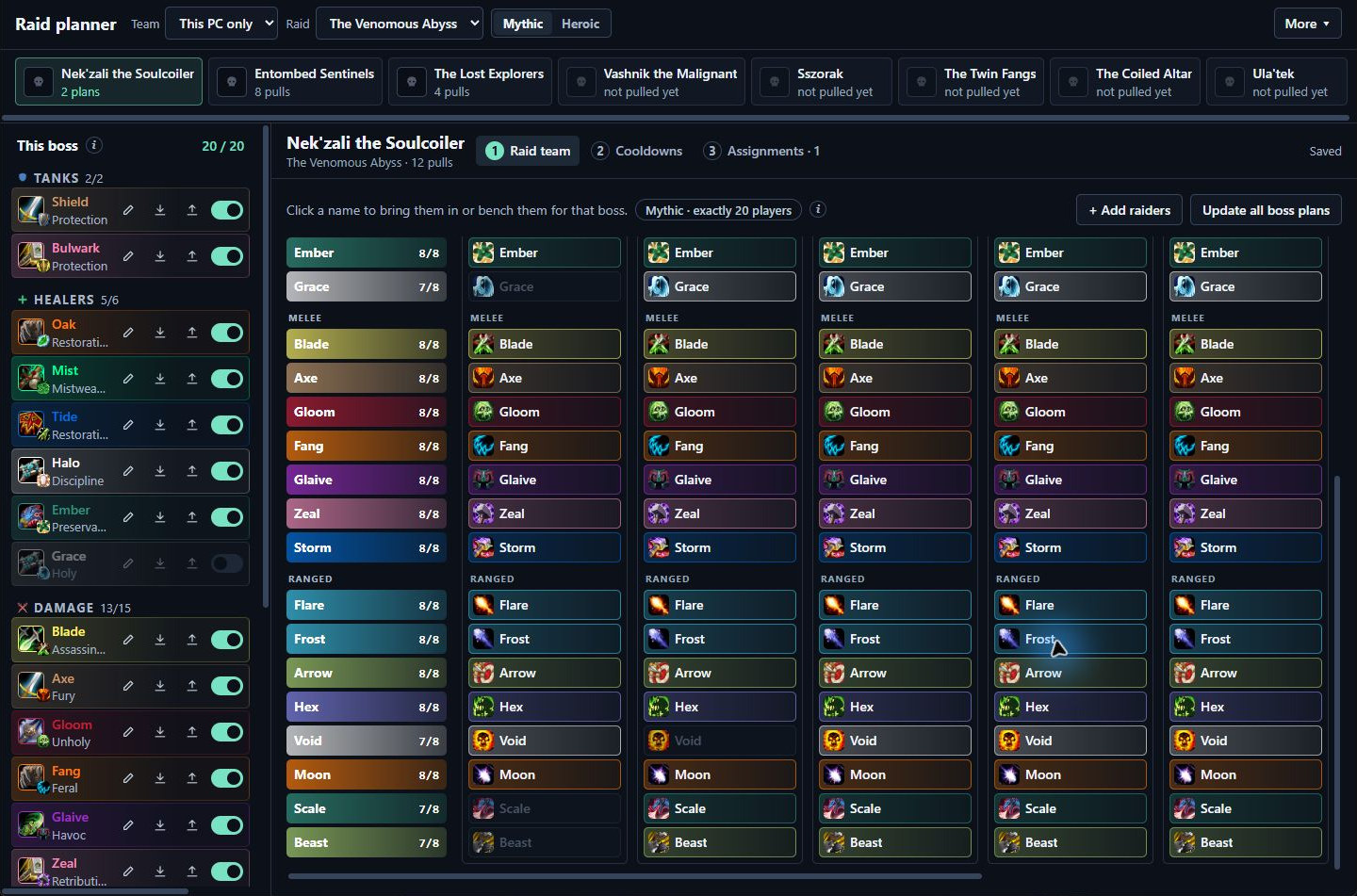
    The planner has three steps: Raid team, Cooldowns and Assignments. In Raid team, click a name to bring that raider in or bench them for this boss.

    The Raid team step: tanks, healers and damage down the side, and who is in for each boss in columns
  2. 2

    Lay out the cooldowns

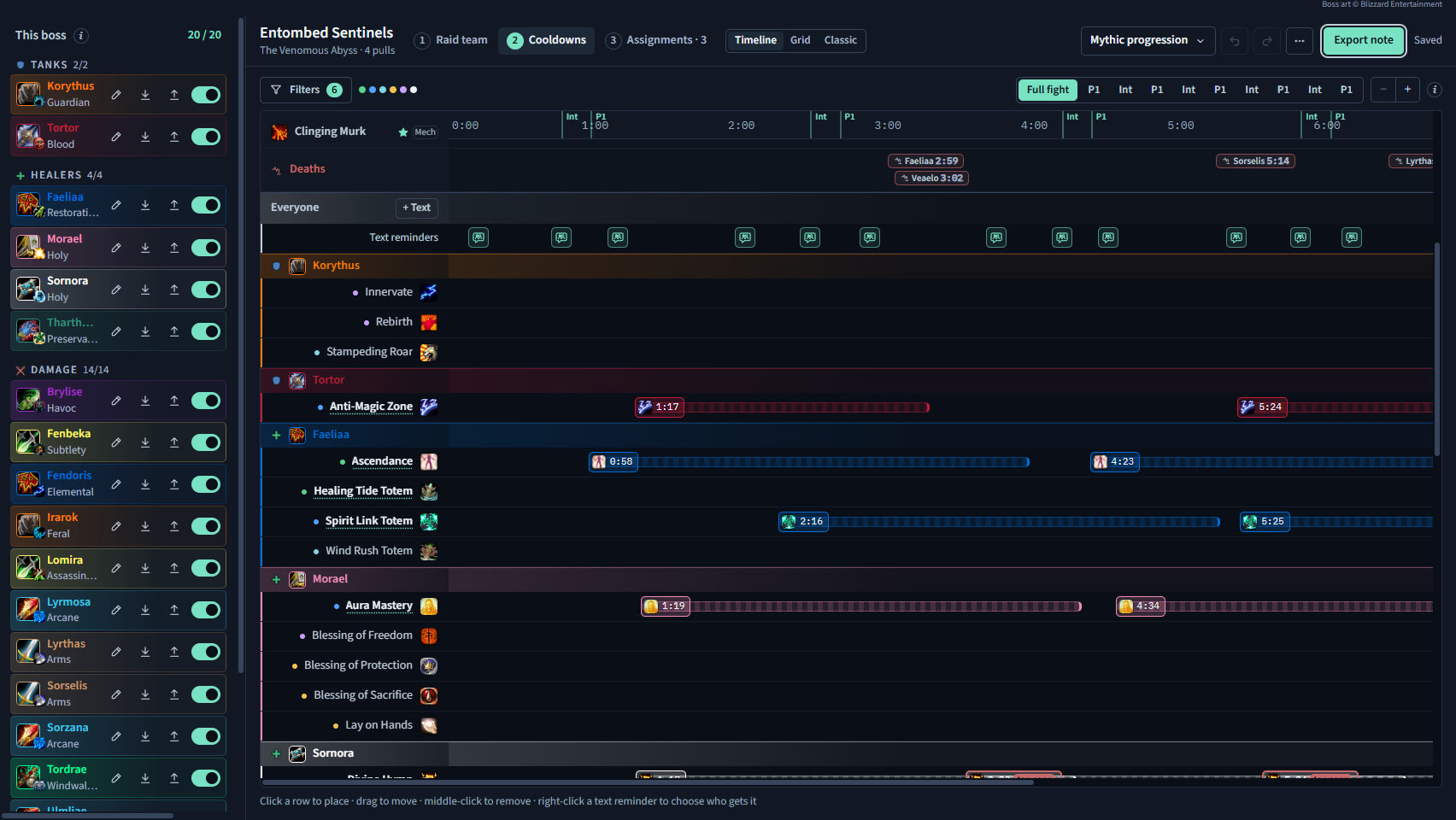
    In Cooldowns, every boss ability has its own lane, with each cast where it happened in the kill. Put each raider's cooldowns under the abilities they answer. Parallax warns you when a cooldown won't be back in time.

    Player cooldown rows placed under the boss timeline
  3. 3

    Open Assignments

    Assignments tell each raider their job: where to soak, when to dispel, when to kick. They go into the same note as the cooldowns.

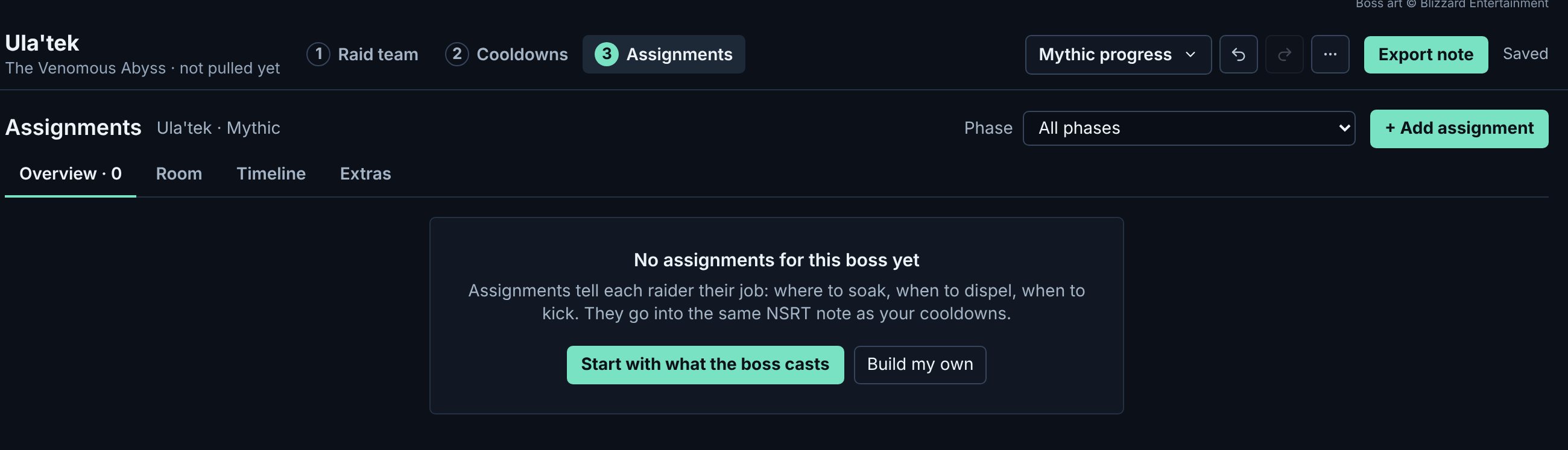
    The step opens on the Overview. For a new plan it offers to Start with what the boss casts, or Build my own. Use the Phase picker at the top to see one phase at a time. The Room, Timeline and Extras tabs each show one thing, so nothing competes for space. Everything is counted on the kill the raid note is timed on, so a cast you pick is the cast the note fires on.

    The Assignments step for a new plan: the Phase picker and + Add assignment at the top, the Overview, Room, Timeline and Extras tabs, and a box offering Start with what the boss casts or Build my own
    1. Phase. Shows one phase at a time, or all of them.
    2. + Add assignment. Starts from what the boss does. It is always here.
    3. Four tabs. Overview lists the jobs; Room, Timeline and Extras each show one thing.
    4. Start with what the boss casts. Lists the boss's abilities, phase by phase, each with a job to choose.
    Click a numbered pin to see what it does. Sample data.
  4. 4

    Add from what the boss does

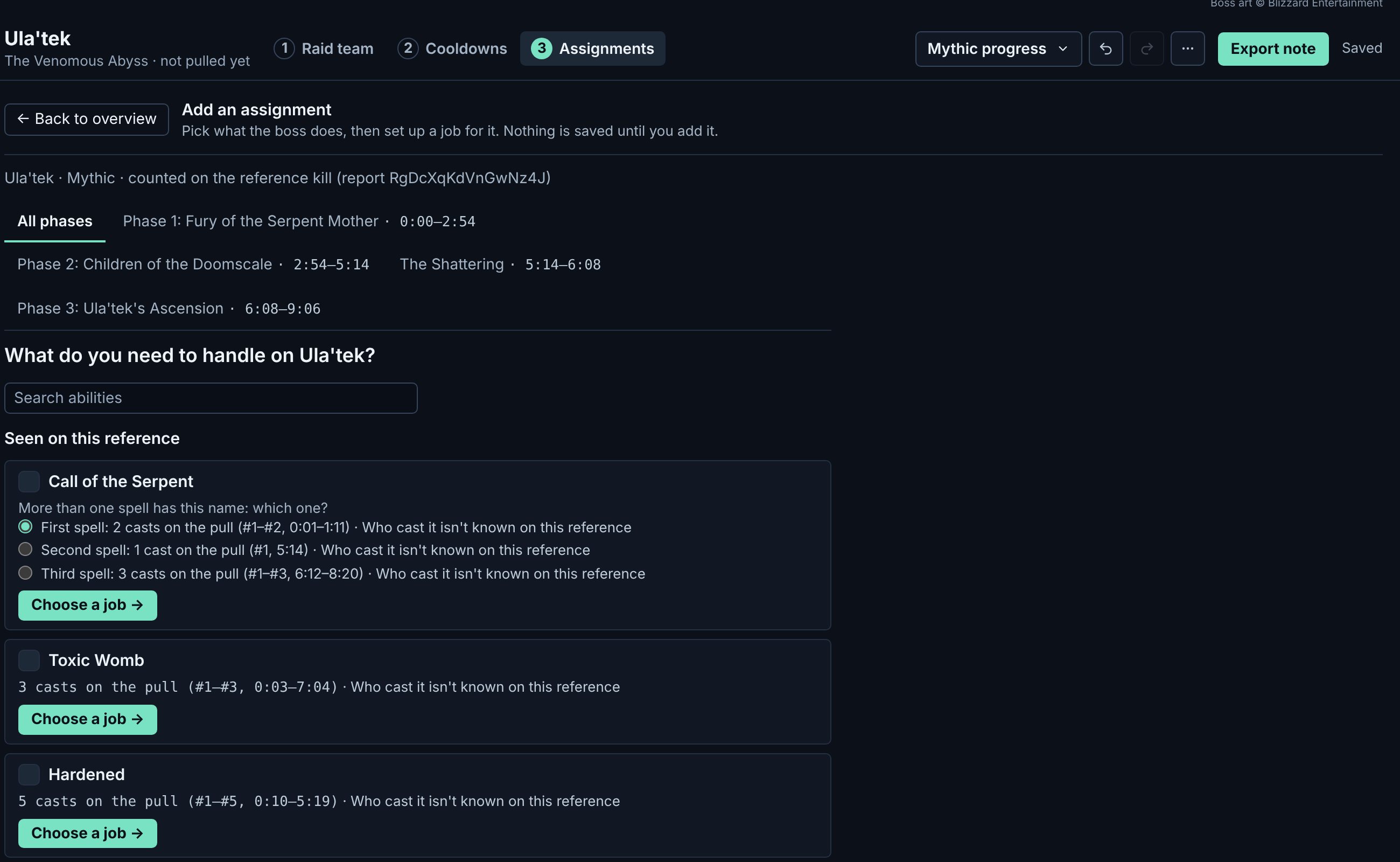
    Press + Add assignment. Pick a phase, and the page lists what the boss casts in it on the kill, with how many casts and who cast them. Each ability has the job raids usually give it: a soak, a dispel, a kick team, a tank swap. Choose a job opens Build my own ready for that ability, and an ability already planned says so.

    A general instruction adds in one click. Other phases, abilities this kill can't time, Custom, and the whole boss kit (a complete draft for the boss with seats filled, best for a new plan) are one click further. When you're done, press ← Back to overview.

    Add an assignment for Ula'tek: the kill's phases across the top, a search box, then each ability the boss casts with its count and a Choose a job button
    1. Phases. The kill's phases with their times. Pick one and the list shows only what the boss casts in it.
    2. Search. Find an ability by name.
    3. An ability. How many casts, when, and who cast it on the kill. Where two spells share a name, pick the one you mean.
    4. Choose a job. Opens Build my own with the ability already picked.
  5. 5

    Build your own

    For anything your raid does its own way, choose Build my own. It takes five short steps, one at a time, and the keyboard works in every one.

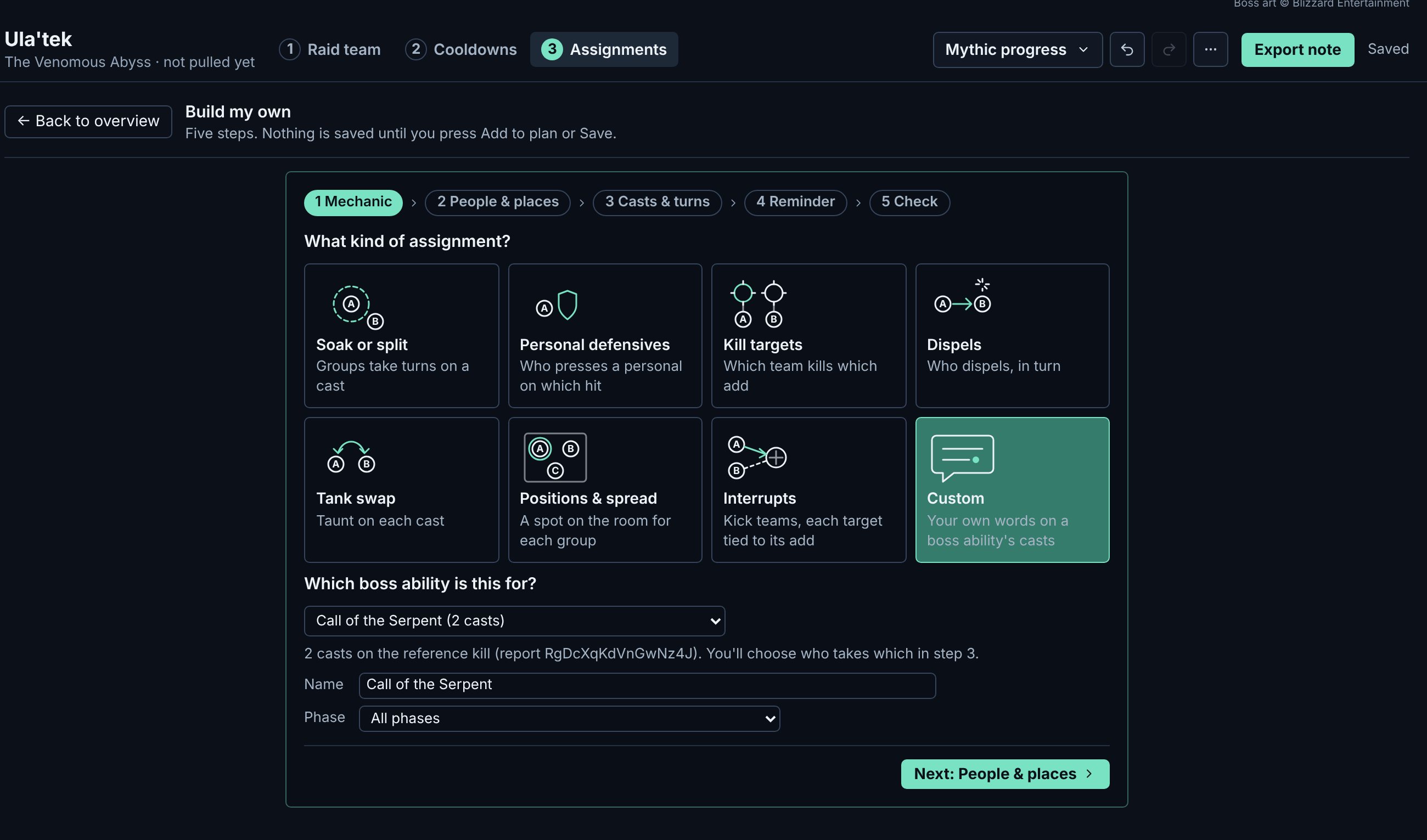
    1. Mechanic: pick the kind of job, each with its own small drawing, and the boss ability it answers.
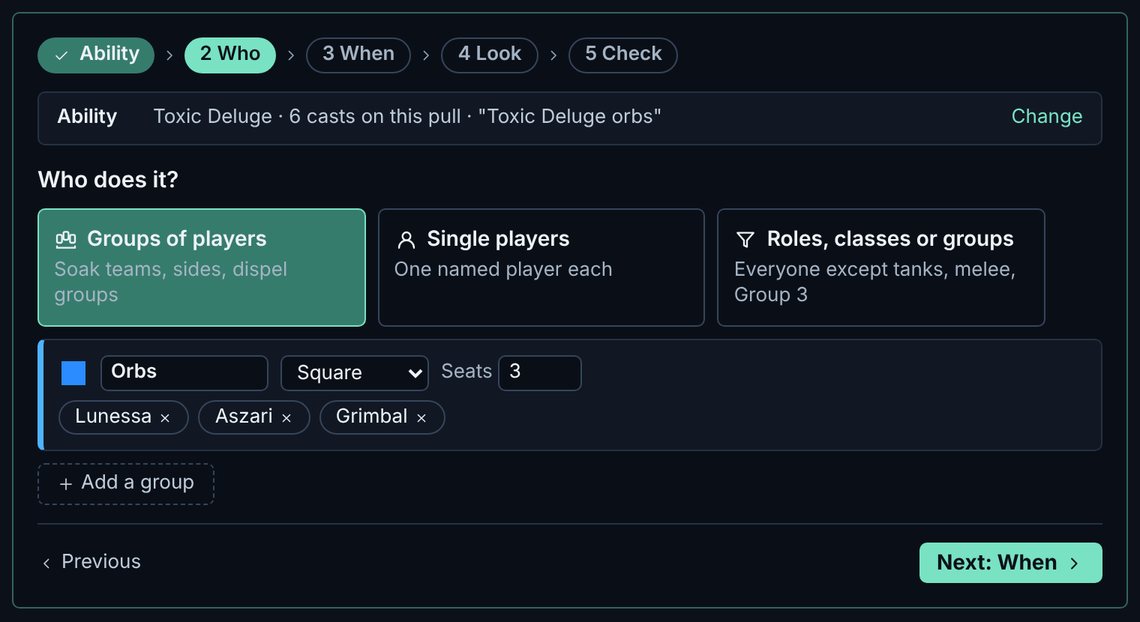
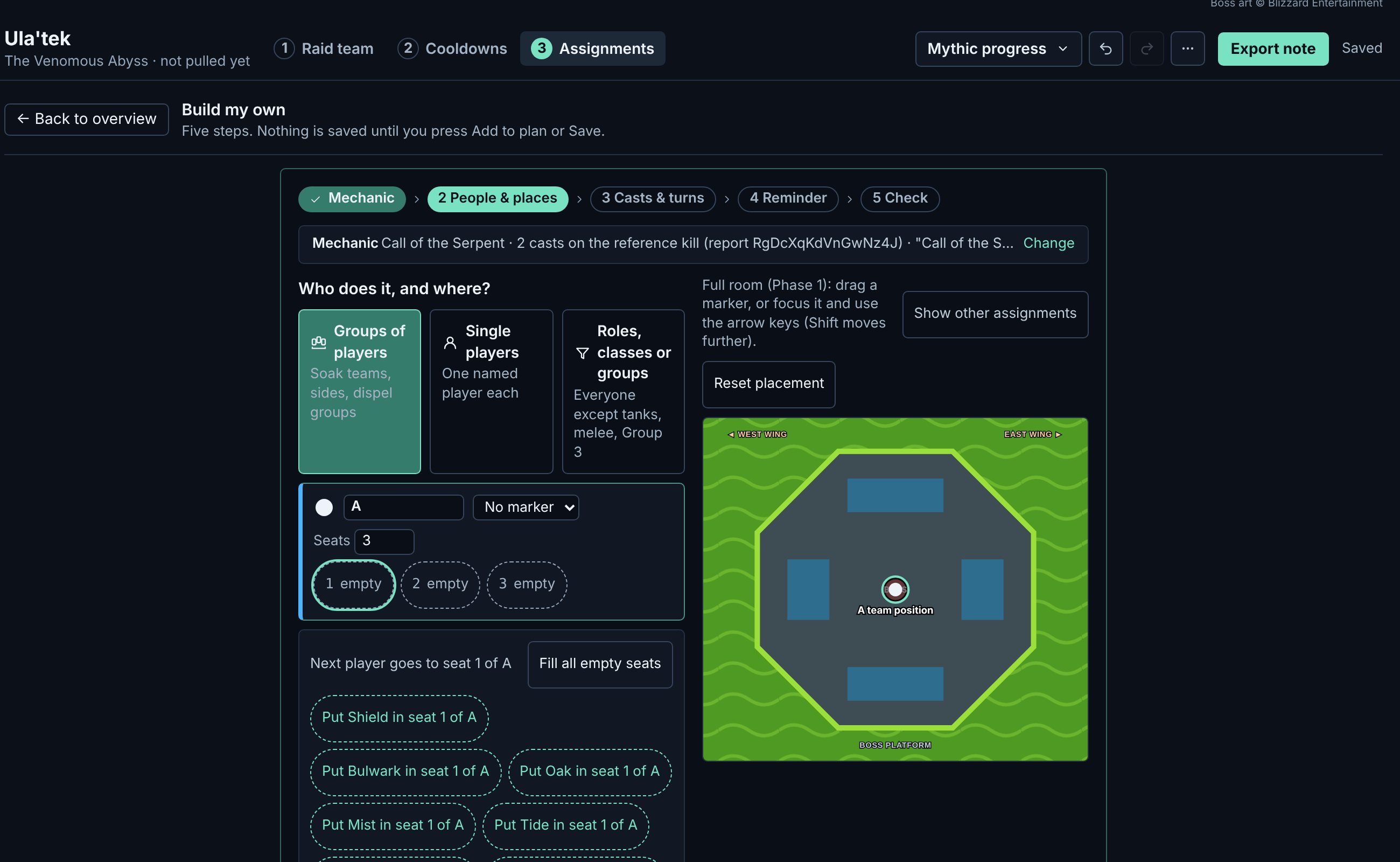
    2. People & places: groups of players, single players, or roles and specs. Seats are numbered beside the phase's room: click a seat, then a player. Fill all empty seats spreads the raid evenly, tanks first, then healers.
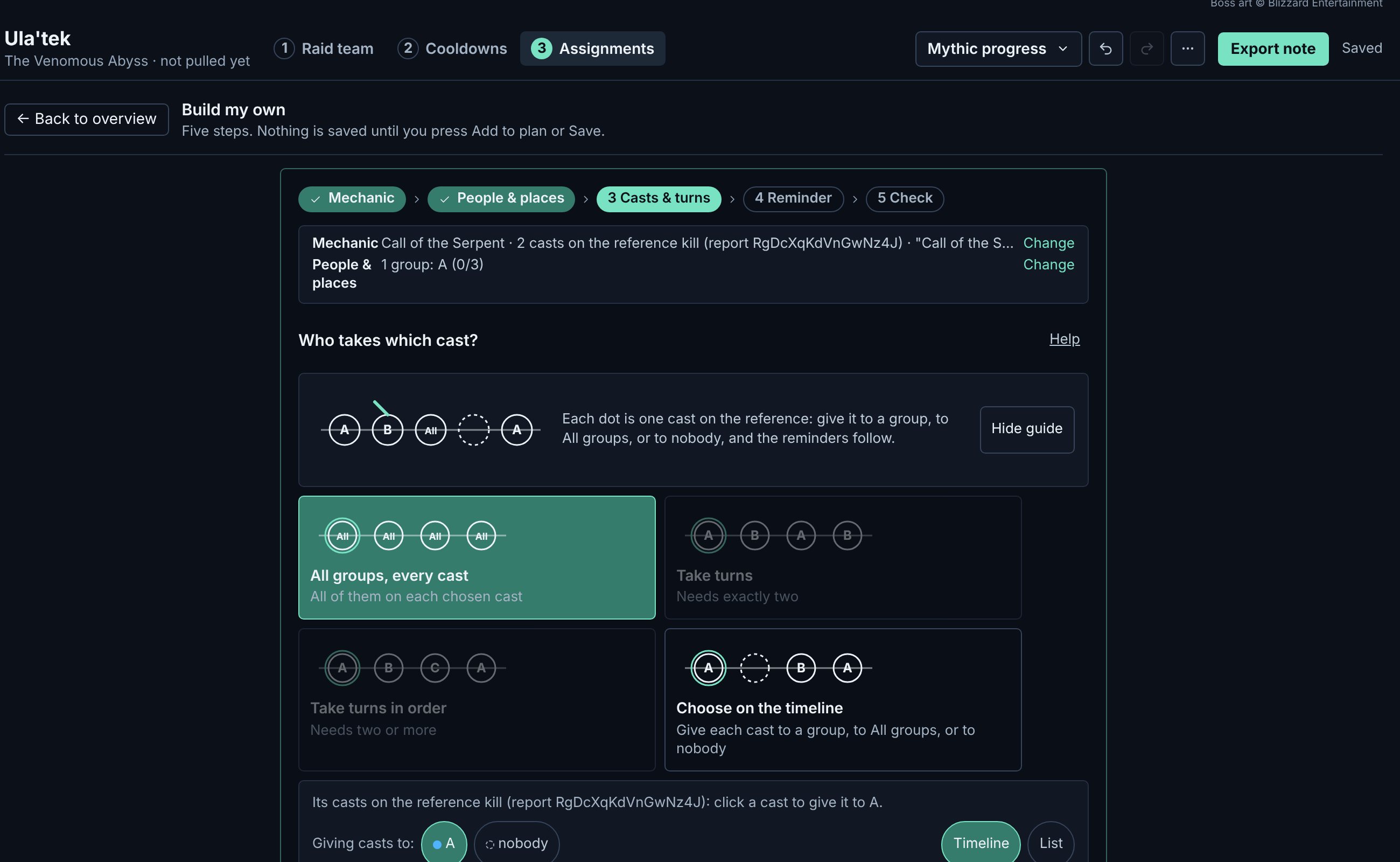
    3. Casts & turns: the four rules are drawn as small timelines: all groups every cast, take turns, take turns in order, or choose on the timeline. The phase's casts sit on a lettered timeline; paint each with the group that takes it.
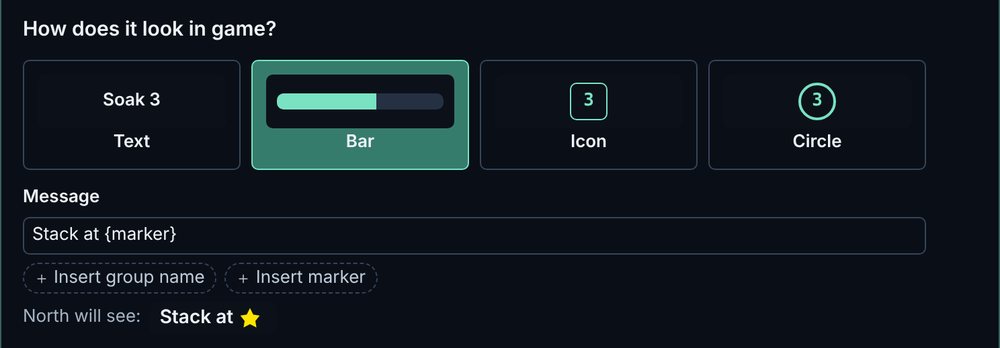
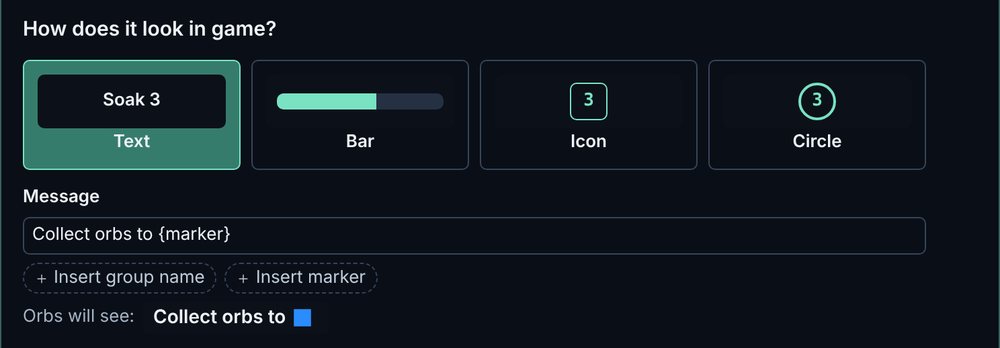
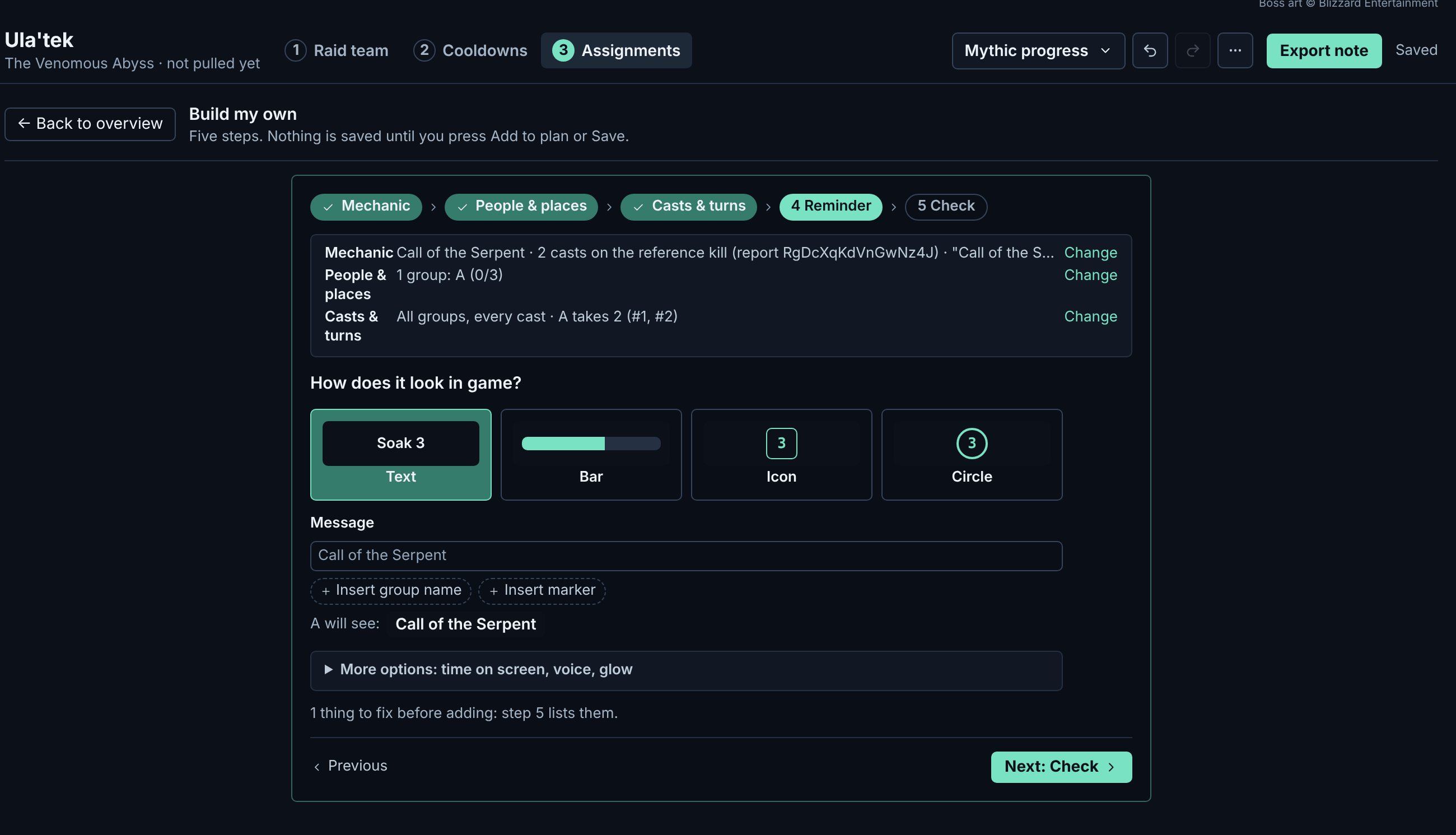
    4. Reminder: text, bar, icon or circle; the message with the group's name or marker; a countdown and a voice if you want them. It shows what a raider will see.
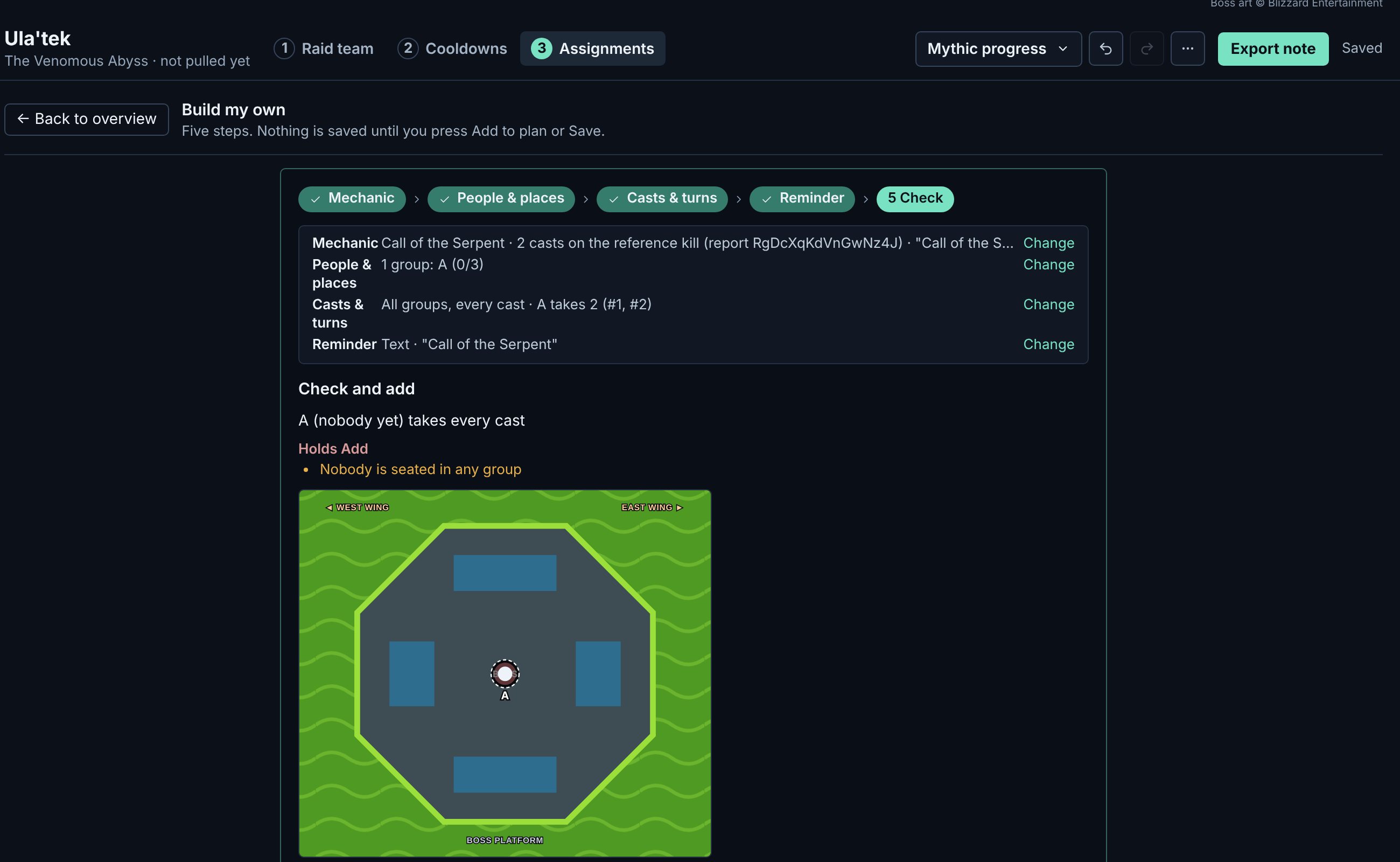
    5. Check: one sentence per group saying who takes which casts and where they stand, and what still needs a look.

    Nothing is saved until you press Add to plan. To change it later, press Edit on its card; leaving with an unadded draft asks first.

    See an example of each of the eight kinds ↓

    Build my own, Mechanic: the eight kinds of assignment as cards with a small drawing each, and the boss ability picked below
    Build my own, People and places: group A with three numbered seats, the players offered for seat 1, and the phase's room beside them
    Build my own, Casts and turns: the four turn rules drawn as small timelines, and the ability's casts on the kill to give out
    Build my own, Reminder: Text, Bar, Icon or Circle, the message, and what a raider will see
    Build my own, Check: who takes every cast, what holds Add, and the room with the group's position
  6. 6

    Set up kick teams

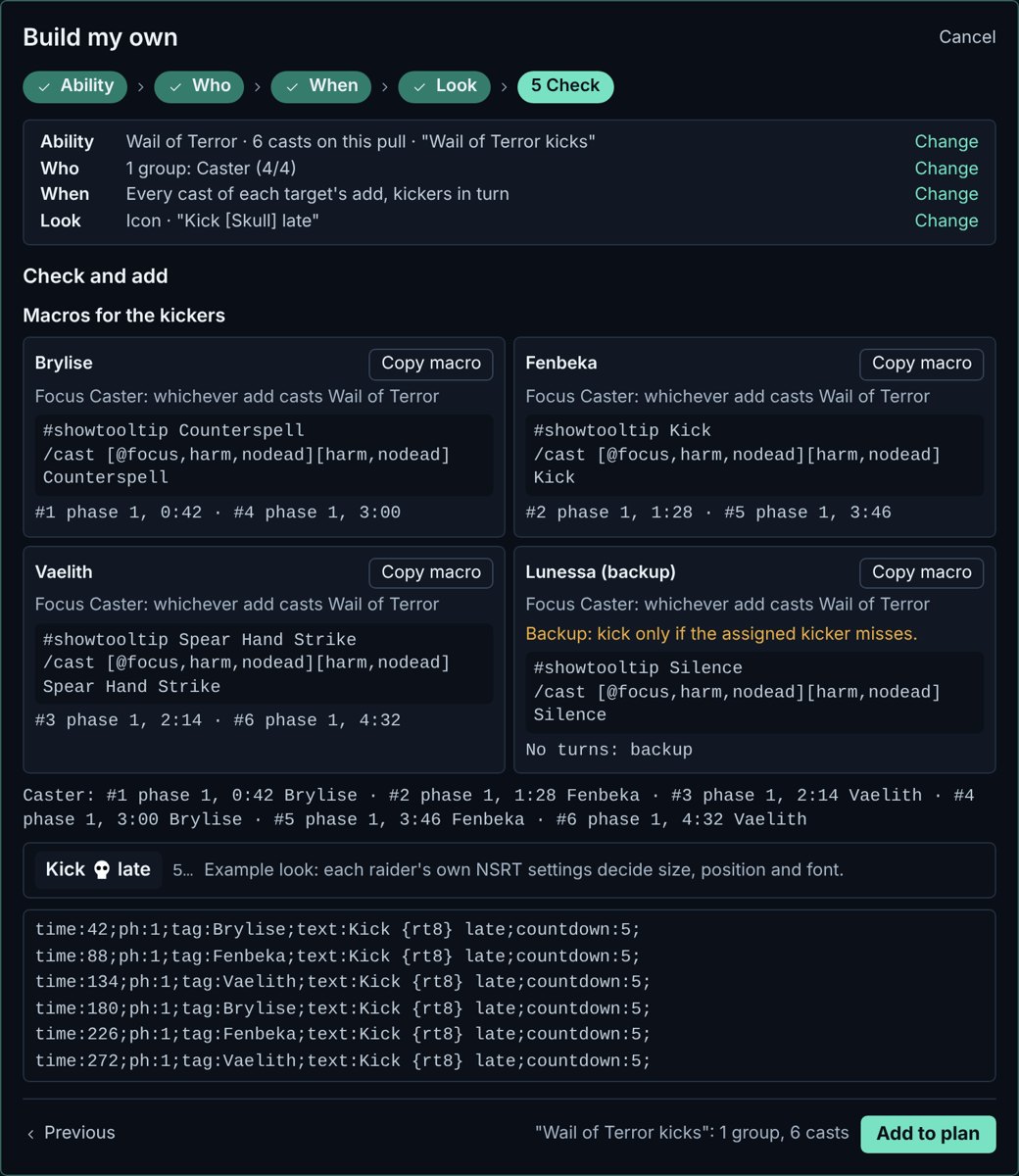
    In Build my own, pick Interrupts. Each target is a marked team of kickers. Tie it to one add, or let it kick every cast. The kickers take the casts in seat order, and the last seats can be backups who take no turn. One target per add makes a team for each add at once.

    The last step shows a card for each kicker: their interrupt, the add to focus, their turns and a macro to copy. Send each kicker their macro.

    Kick teams are checked too: a turn that comes before the kicker's interrupt is back is flagged.

    The kick team's Check step: a macro card for each kicker with their interrupt, the add to focus and their turns
  7. 7

    Check before the raid

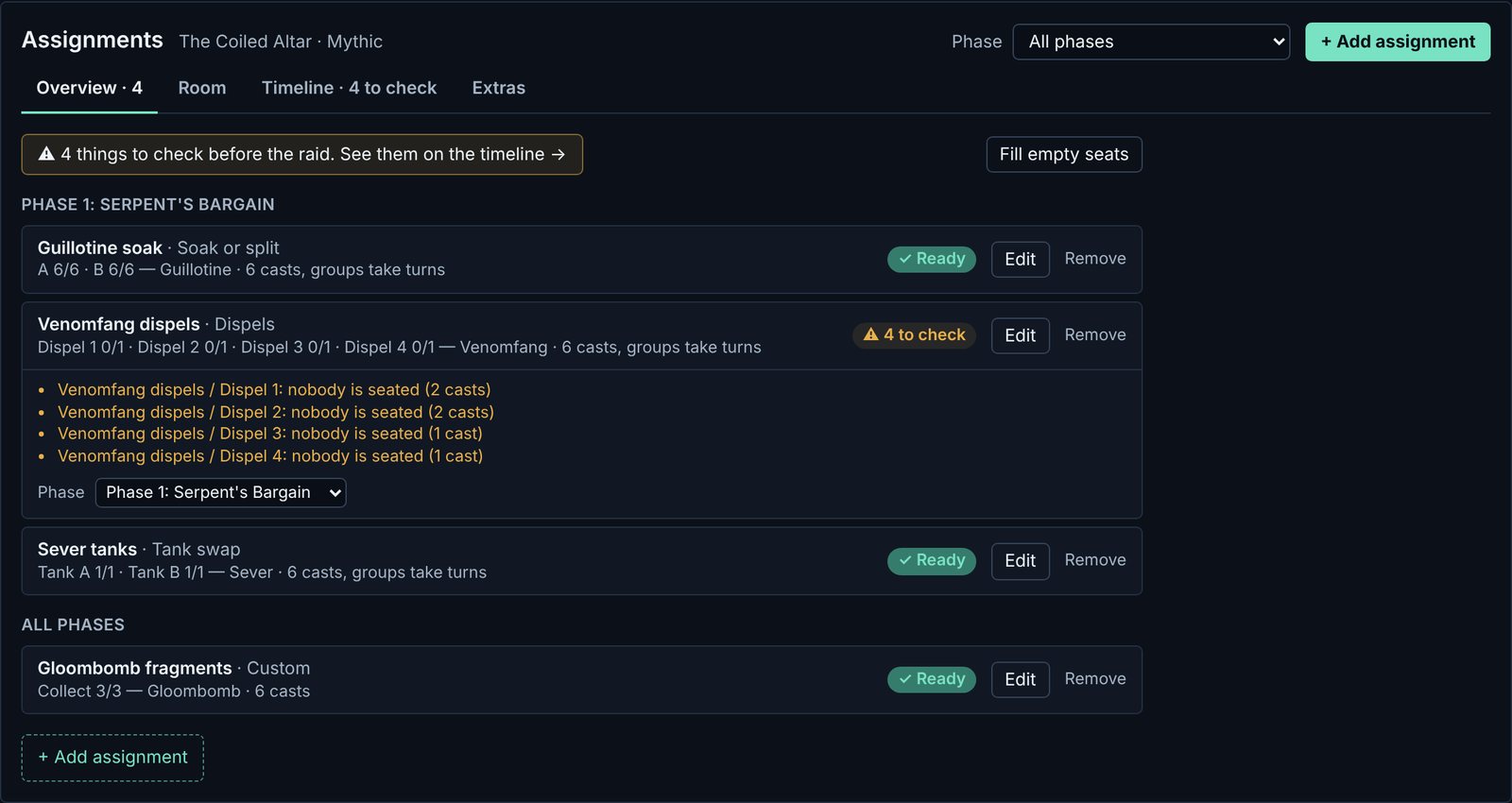
    Back on the Overview, every assignment says Ready or how many things there are to check. Click a card to see what. Here, nobody is seated for the dispels yet: Fill empty seats seats your team in one click, or Edit the assignment to choose.

    Ready means no flagged checks, not that everything was checked. Open Not checked to see the limits: a kick target tied to one add has its turns in the note preview, and its cooldown and job clashes are not checked on the board.

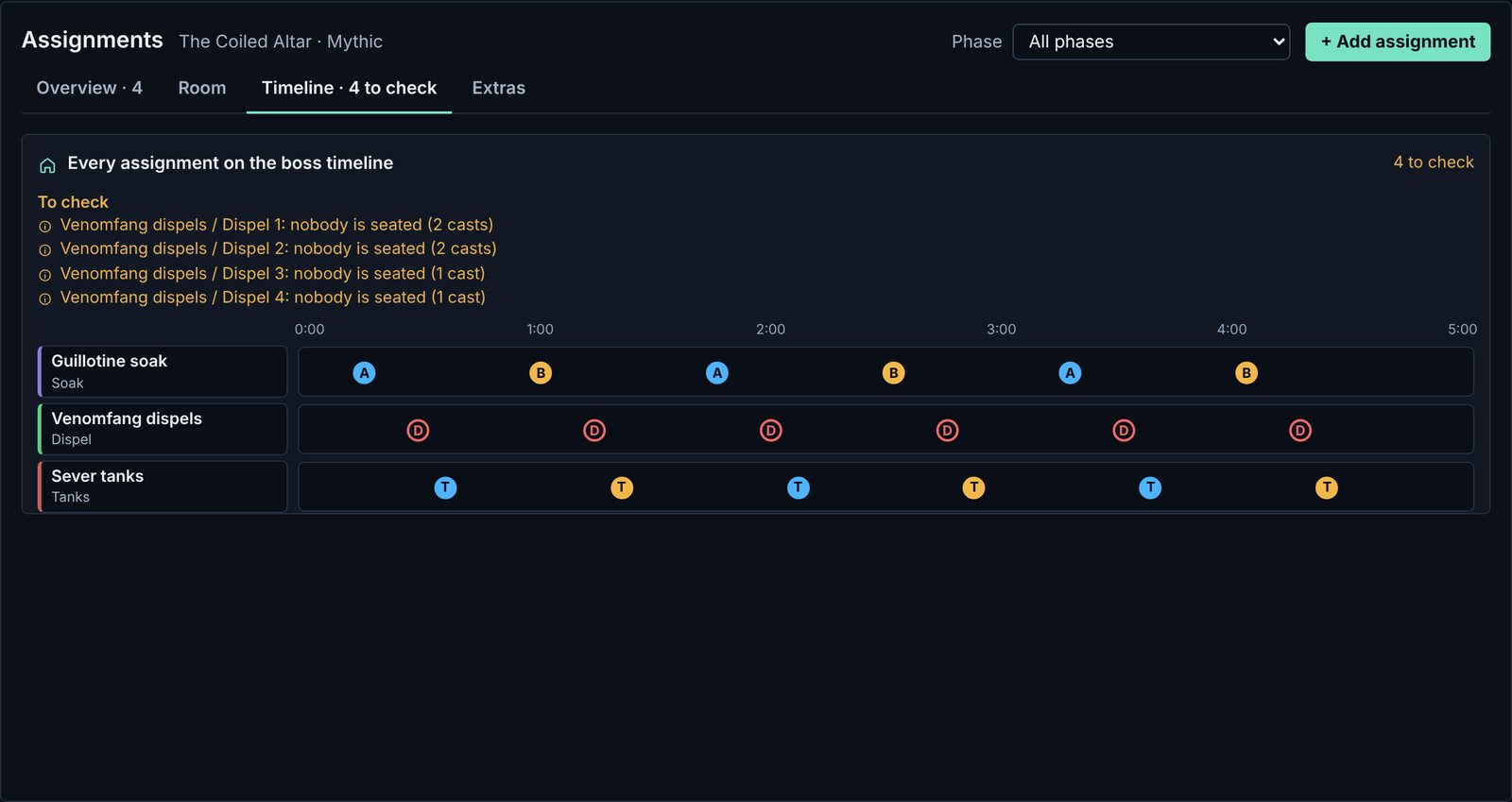
    The Timeline tab puts every assignment on one boss timeline. It flags a group nobody is in, a cast nobody takes, a player with two jobs at once, and a kick that comes before the interrupt is back. The Room tab shows where each group stands; drag a marker to move it.

    The Overview: Guillotine soak marked Ready, and Venomfang dispels opened to show four groups nobody is seated in
    1. The summary. How many things to check across the plan. It links to the Timeline tab.
    2. Fill empty seats. Seats your team in every empty seat in one click.
    3. To check. This job has 4 things to check. Click the card to list them. Ready means no flagged checks.
    4. Phase. Move a job to another phase without opening it.
    The Timeline tab: each assignment on its own lane across the pull, with the things to check listed above
  8. 8

    Copy the note into the game

    Open Export note. Choose NSRT or MRT, then This boss, All bosses or One raider, and press Copy NSRT note. Paste it into the addon in game.

    With NSRT, each raider gets only the lines meant for them, as reminders on screen: a line can name players, or roles, classes or groups. MRT shows the raid one shared note. Every change saves on its own, so what you copy is always the saved plan.

    time:42;ph:1;tag:Brylise;text:Kick {rt8};countdown:5;
    time:60;ph:1;tag:Brylise Fenbeka Irarok;text:Soak {rt4};countdown:3;
    time:88;ph:1;tag:Fenbeka;text:Kick {rt8};countdown:5;
    time:92;ph:1;tag:Morael;text:Dispel Venomfang;
    An example of NSRT note lines. Names are invented.
  9. 9

    After the pull

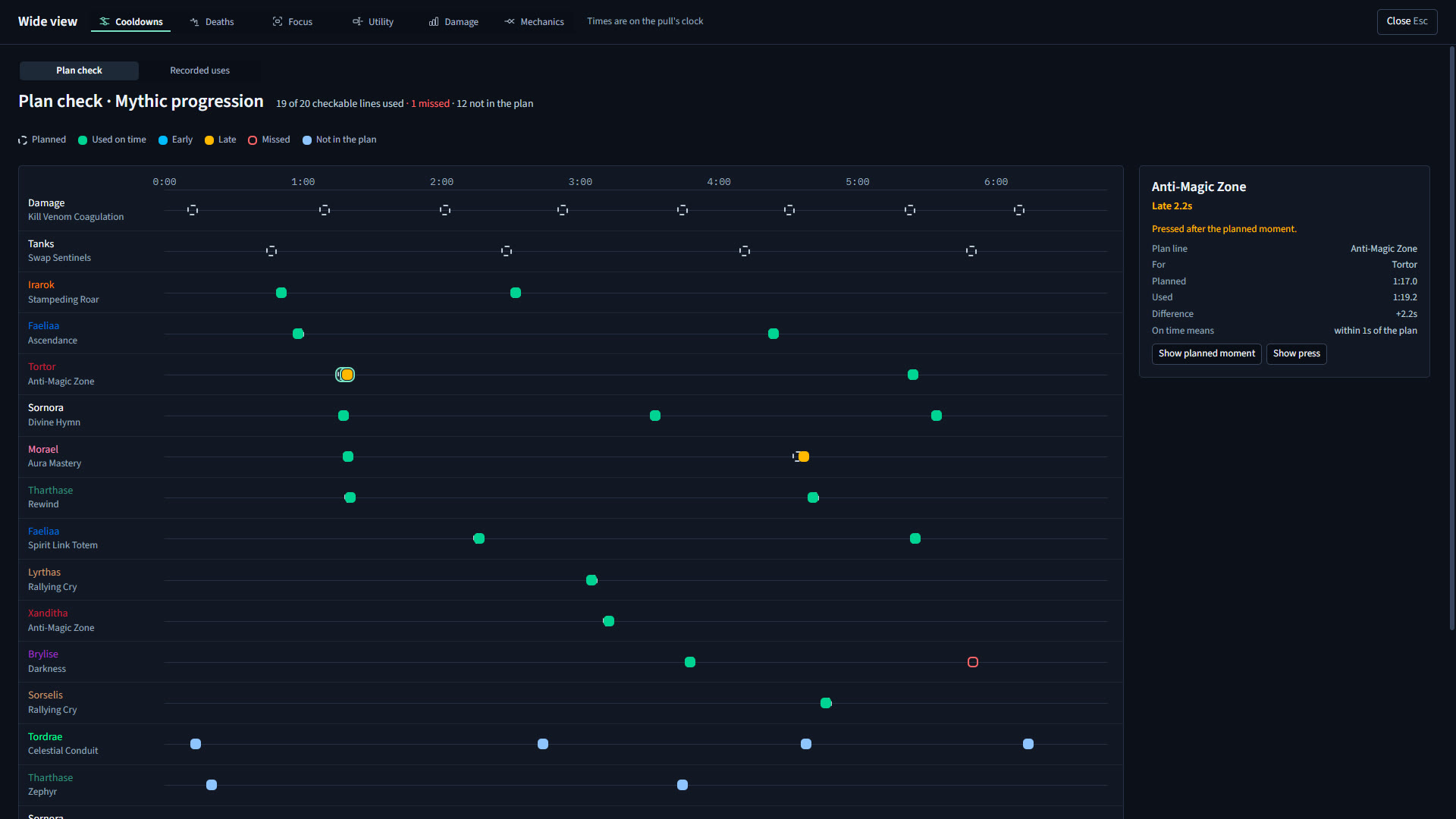
    Anyone running Parallax records the pull from their screen. In Review, each recording lines up to the combat log. Each planned cooldown is marked on time, early, late or missed, one click from that moment in the video.

    Change what didn't work, copy the note again, and pull.

    Plan check: each planned cooldown across the pull, marked on time, late or missed
OPTIONAL · STEP 5 IN MORE DEPTH

The eight kinds of assignment

Build my own starts from one of eight kinds. Each one is an editable starting preset: the later steps change its groups, words and look. These are examples on sample data; nothing here builds or saves anything.

Choose a kind to see an example.

Build my own, Mechanic: the eight kinds of assignment as cards

Soak or split

Groups take turns on the casts of one boss ability, each group on its own marker.
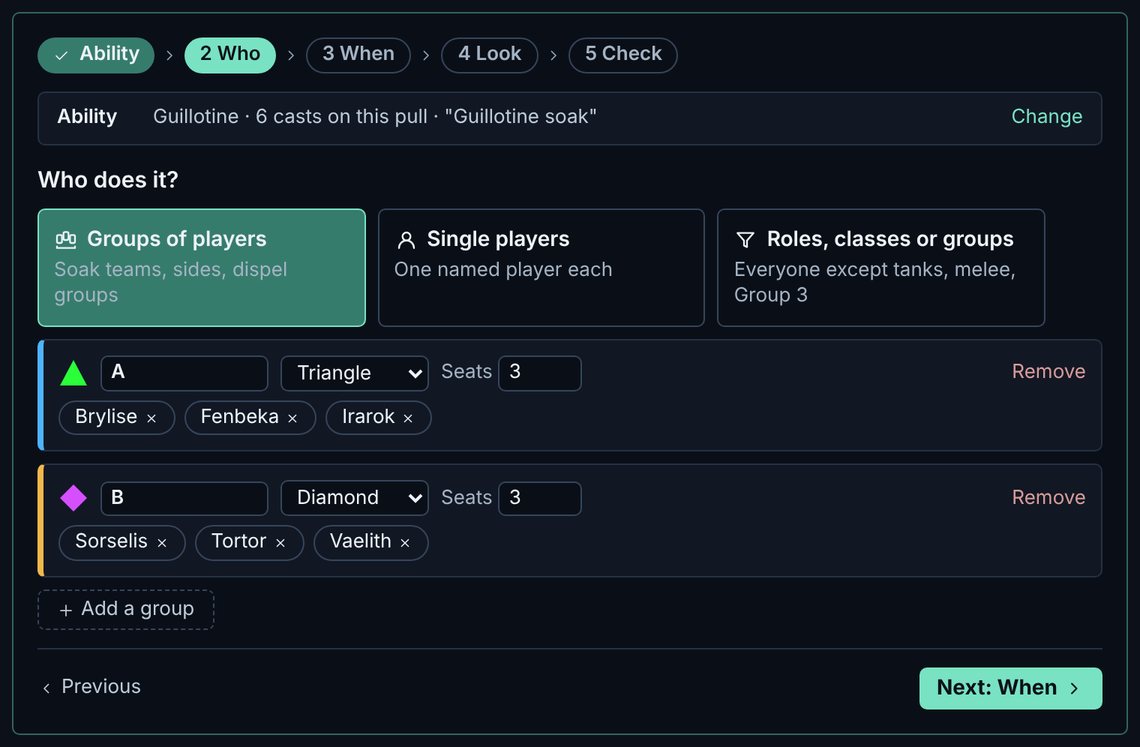
People & places: group A on the Triangle, group B on the Diamond, three seats each.

In the note

  1. 0:14Brylise, Fenbeka, IrarokSoak circle, 6 s on screen, countdown 3, says “Soak Triangle”
  2. 1:00Sorselis, Tortor, VaelithSoak circle, 6 s on screen, countdown 3, says “Soak Diamond”
Show the raw note lines
time:14;ph:1;tag:Brylise Fenbeka Irarok;text:Soak {rt4};dur:6;DisplayType:Circle;countdown:3;TTS:Soak Triangle;
time:60;ph:1;tag:Sorselis Tortor Vaelith;text:Soak {rt3};dur:6;DisplayType:Circle;countdown:3;TTS:Soak Diamond;

On the raider’s screen
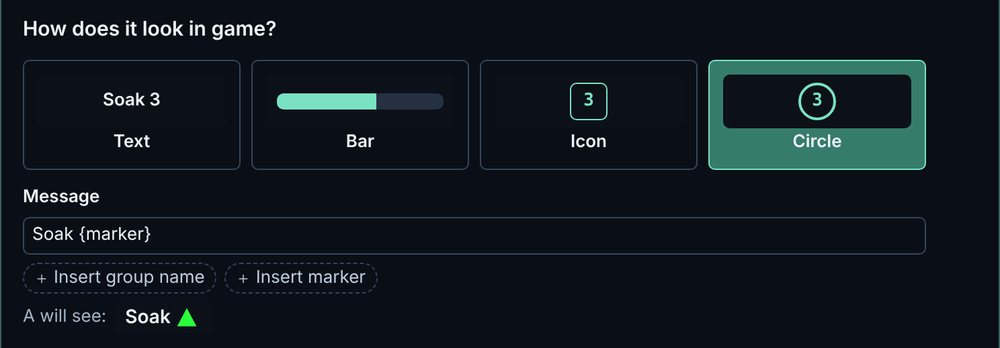
The Reminder step preview for Soak or split
Parallax’s preview in the Look step. Each raider’s NSRT settings decide the final look.

Tip Need a third group? Press Add a group; the turns go round in order.
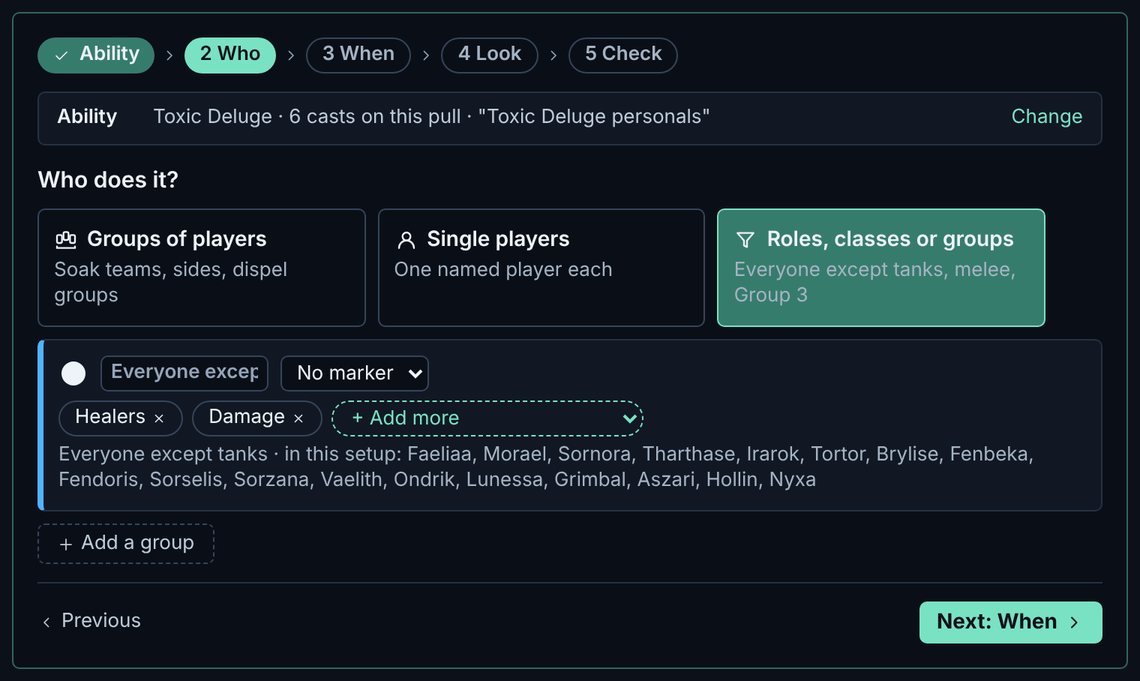
Personal defensives

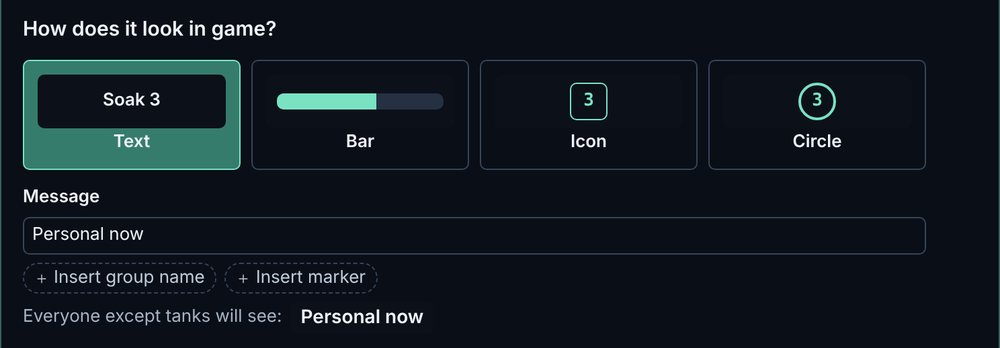
Tells healers and damage when to press a personal defensive, on the hits you choose. In the app the group reads “Everyone except tanks”.

People & places: one group by role, everyone except tanks.

In the note

  1. 0:21Healers and damagePersonal nowtext, 4 s on screen, countdown 3, says “Personal now”
  2. 1:07Healers and damagePersonal nowtext, 4 s on screen, countdown 3, says “Personal now”
Show the raw note lines
time:21;ph:1;tag:healer damager;text:Personal now;dur:4;DisplayType:Text;countdown:3;TTS:Personal now;
time:67;ph:1;tag:healer damager;text:Personal now;dur:4;DisplayType:Text;countdown:3;TTS:Personal now;

On the raider’s screen

The Reminder step preview for Personal defensives
Parallax’s preview in the Look step. Each raider’s NSRT settings decide the final look.

Tip In When, keep only the hits that need it, so the reminder still means something.

Kill targets

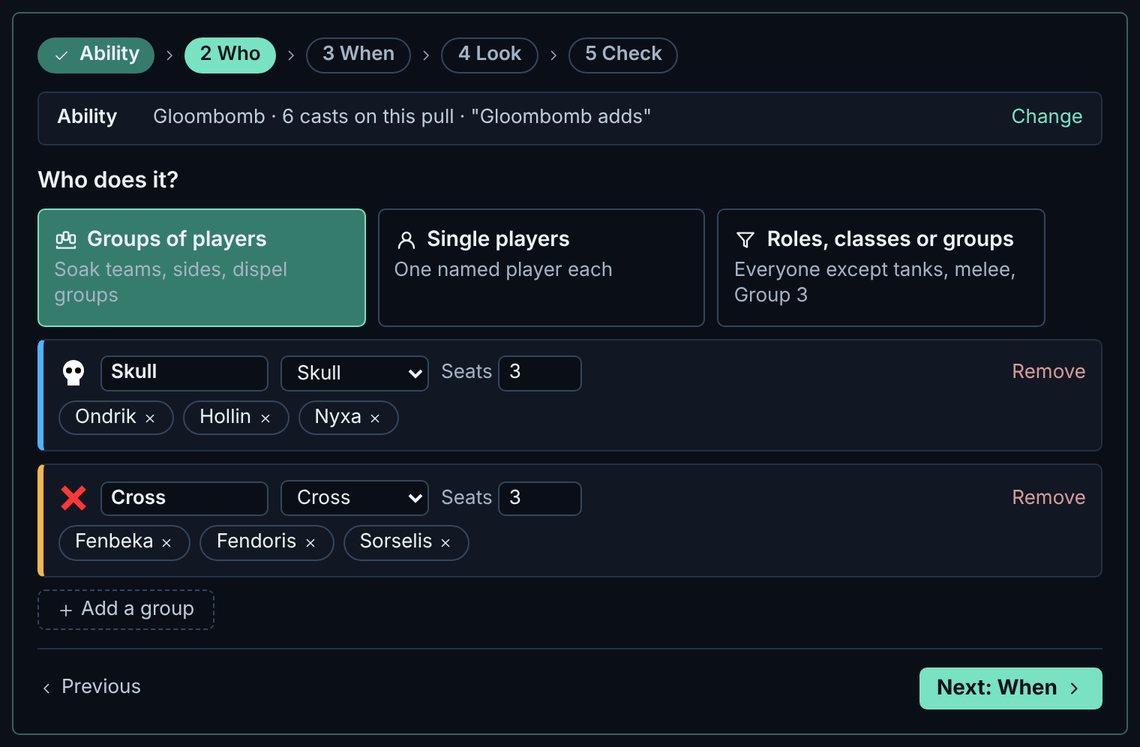
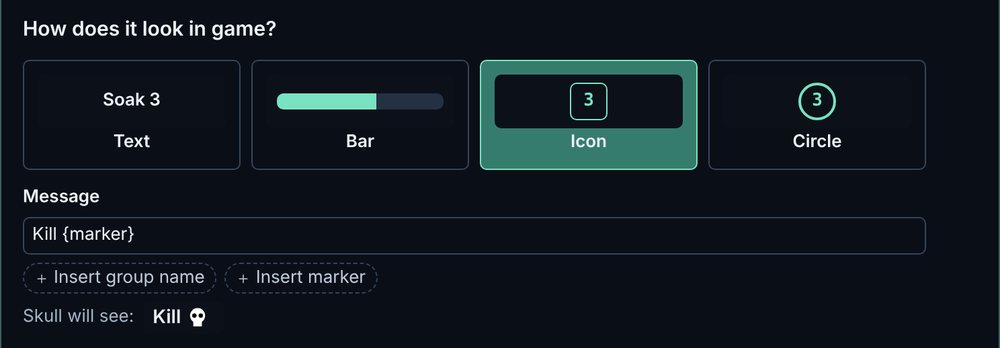
Which team kills which add: each team has a marker and sees only its own target.

People & places: the Skull team and the Cross team, three players each.

In the note

  1. 0:49Ondrik, Hollin, NyxaKill icon, 5 s on screen, countdown 5
  2. 1:35Ondrik, Hollin, NyxaKill icon, 5 s on screen, countdown 5
Show the raw note lines
time:49;ph:1;tag:Ondrik Hollin Nyxa;text:Kill {rt8};dur:5;DisplayType:Icon;countdown:5;
time:95;ph:1;tag:Ondrik Hollin Nyxa;text:Kill {rt8};dur:5;DisplayType:Icon;countdown:5;

On the raider’s screen

The Reminder step preview for Kill targets
Parallax’s preview in the Look step. Each raider’s NSRT settings decide the final look.

Tip Mark the adds in game with the same markers, so the reminder and the target match.

Dispels

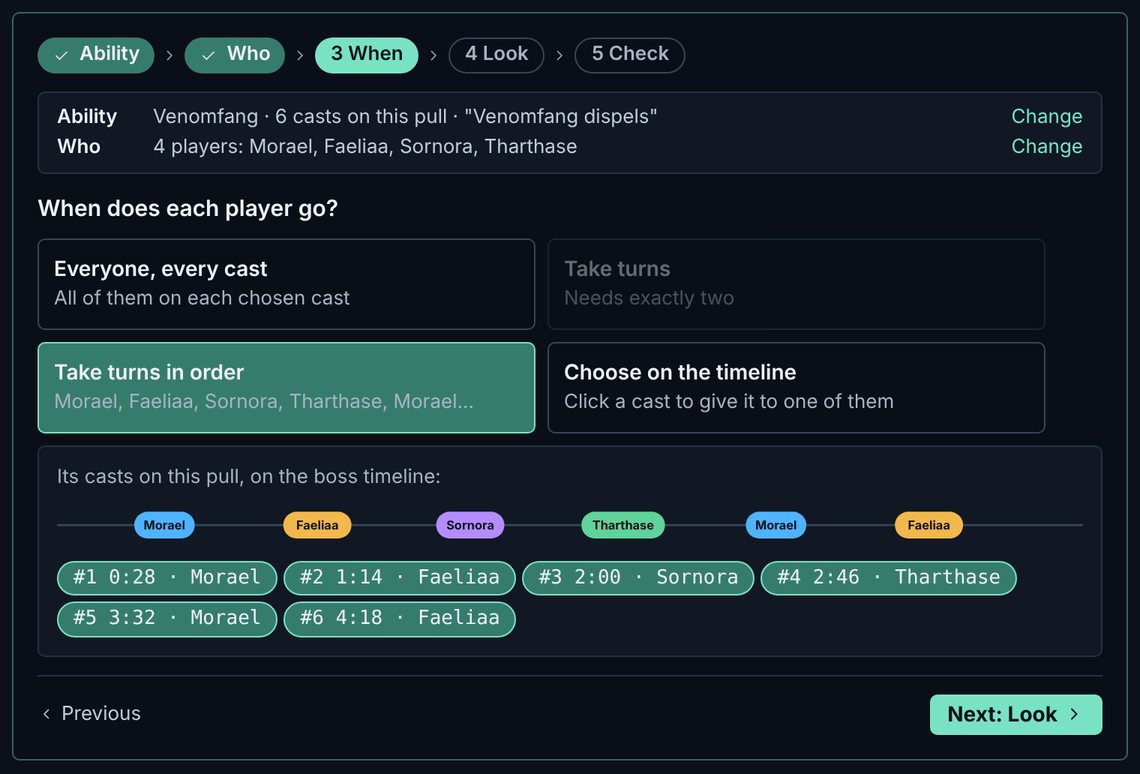
Who dispels, in turn: each cast goes to the next dispeller in order.

Casts & turns: four dispellers taking the six casts in order.

In the note

  1. 0:28MoraelDispeltext, 3 s on screen
  2. 1:14FaeliaaDispeltext, 3 s on screen
Show the raw note lines
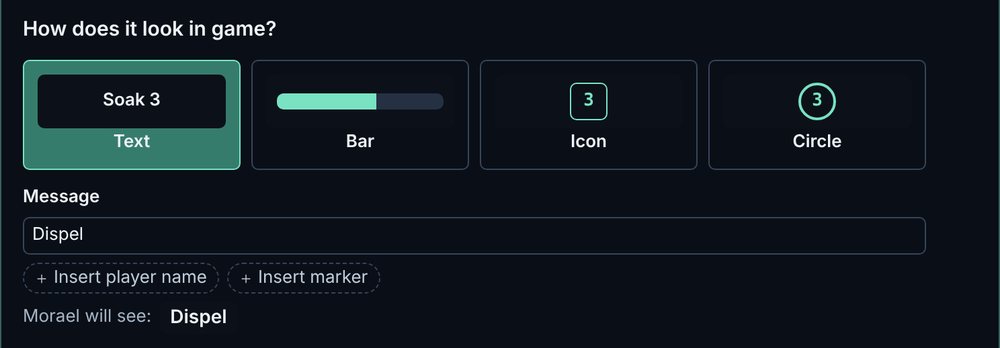
time:28;ph:1;tag:Morael;text:Dispel;dur:3;DisplayType:Text;
time:74;ph:1;tag:Faeliaa;text:Dispel;dur:3;DisplayType:Text;

On the raider’s screen

The Reminder step preview for Dispels
Parallax’s preview in the Look step. Each raider’s NSRT settings decide the final look.

Tip An empty seat shows on the Overview as a thing to check; Fill empty seats fills it.

Tank swap

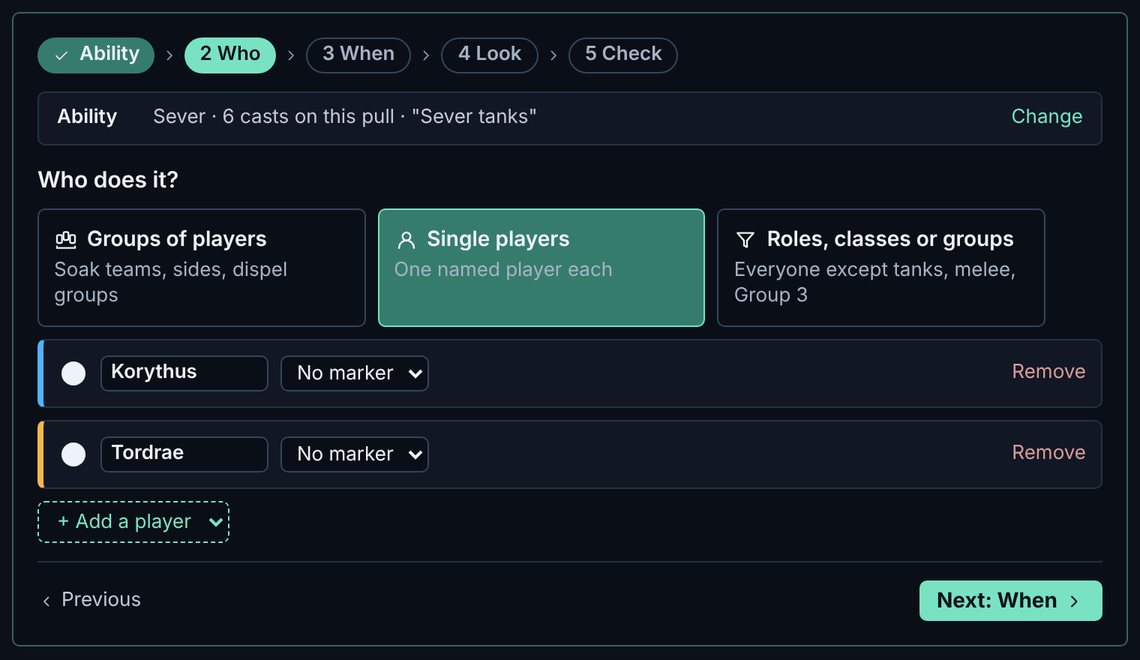
A taunt reminder on each cast, the tanks taking turns. It starts with the first two tanks in your setup.

People & places: the two tanks as single players.

In the note

  1. 0:35KorythusTaunticon, 5 s on screen, countdown 3, glows Korythus’s frame
  2. 1:21TordraeTaunticon, 5 s on screen, countdown 3, glows Tordrae’s frame
Show the raw note lines
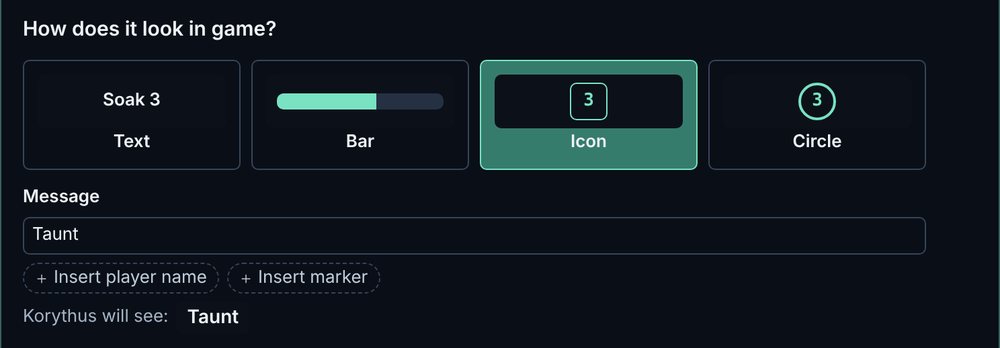
time:35;ph:1;tag:Korythus;text:Taunt;dur:5;DisplayType:Icon;countdown:3;glowunit:Korythus;
time:81;ph:1;tag:Tordrae;text:Taunt;dur:5;DisplayType:Icon;countdown:3;glowunit:Tordrae;

On the raider’s screen

The Reminder step preview for Tank swap
Parallax’s preview in the Look step. Each raider’s NSRT settings decide the final look.

Tip Each line names the tank who taunts, and glowunit highlights that tank’s own frame. Swapped tanks? Change the two players in Who; the turns follow.

Positions & spread

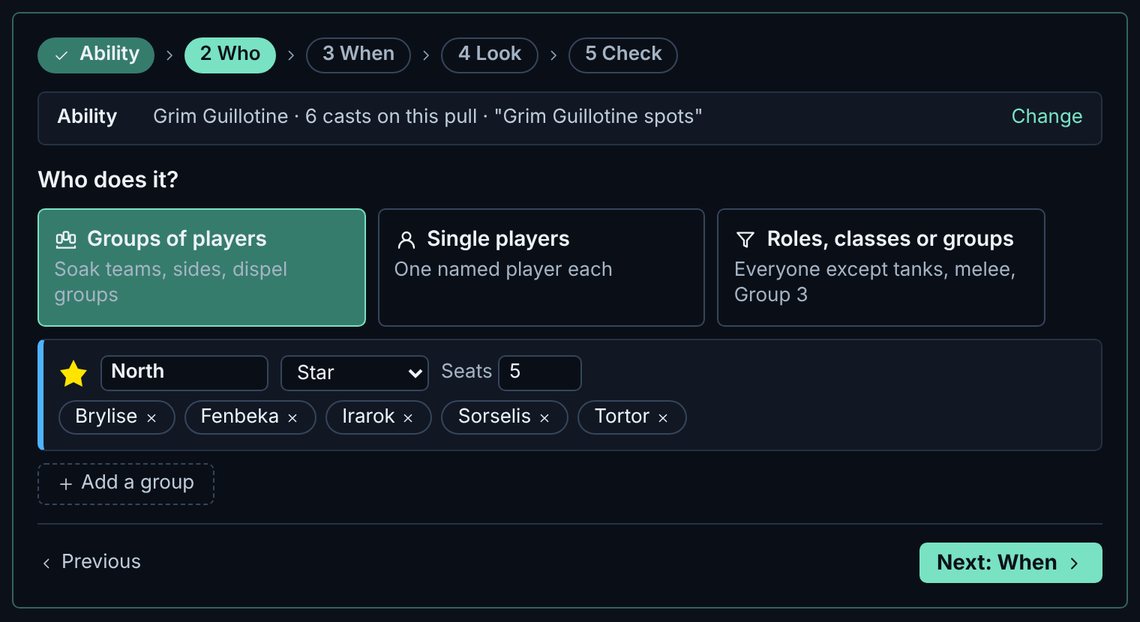
Tells each group where to go for an ability, by marker. It doesn’t place the groups on the room: you do that in the Room tab.

People & places: one group of five, North, on the Star.

In the note

  1. 0:56Brylise, Fenbeka, Irarok, Sorselis, TortorStack at bar, 6 s on screen
  2. 1:42Brylise, Fenbeka, Irarok, Sorselis, TortorStack at bar, 6 s on screen
Show the raw note lines
time:56;ph:1;tag:Brylise Fenbeka Irarok Sorselis Tortor;text:Stack at {rt1};dur:6;DisplayType:Bar;
time:102;ph:1;tag:Brylise Fenbeka Irarok Sorselis Tortor;text:Stack at {rt1};dur:6;DisplayType:Bar;

On the raider’s screen

The Reminder step preview for Positions & spread
Parallax’s preview in the Look step. Each raider’s NSRT settings decide the final look.

Tip Drag the markers in the Room tab so the room picture matches the note.

Interrupts

Kick teams: each target is a marked team of kickers who take its casts in seat order. The last seats can be backups who take no turn.

Check: a card for each kicker with the add to focus, their turns and a macro to copy. The raw lines at the bottom are the ones shown under In the note.

In the note

  1. 0:42BryliseKick latecountdown 5
  2. 1:28FenbekaKick latecountdown 5
Show the raw note lines
time:42;ph:1;tag:Brylise;text:Kick {rt8} late;countdown:5;
time:88;ph:1;tag:Fenbeka;text:Kick {rt8} late;countdown:5;

On the raider’s screen

Only the kicker named on a line gets that reminder, with a 5-second countdown. Each kicker also gets the macro you send them. Their interrupt is shown when their spec is known.

Tip One target per add makes a team for each add at once. Re-import pulls from before 0.3.0 to tie a target to one add.

Custom

Your own words, timed to the casts of a boss ability like every other kind, not to free clock times.

Reminder: the words and the marker the group will see.

In the note

  1. 0:21Lunessa, Aszari, GrimbalCollect orbs to text, 4 s on screen, says “Orbs”
  2. 1:07Lunessa, Aszari, GrimbalCollect orbs to text, 4 s on screen, says “Orbs”
Show the raw note lines
time:21;ph:1;tag:Lunessa Aszari Grimbal;text:Collect orbs to {rt6};dur:4;DisplayType:Text;TTS:Orbs;
time:67;ph:1;tag:Lunessa Aszari Grimbal;text:Collect orbs to {rt6};dur:4;DisplayType:Text;TTS:Orbs;

On the raider’s screen

The Reminder step preview for Custom
Parallax’s preview in the Look step. Each raider’s NSRT settings decide the final look.

Tip Use Insert marker so raiders see the marker icon, not its name.

Ready to plan your first boss?

Parallax is free for Windows during the Alpha.